philter
hey guys,
here are a few microtonic scripts i made. feedback is always appreciated. add added a "mini view" feature to most of the scripts, here is a short explanation:Mini view: what it is and how to use it
The problem it solves. A script’s window sits on top of Microtonic’s own interface and covers most of it.
A script that works continuously (an XY pad, an LFO, a path player, anything that keeps changing parameters)
only runs while its window is open. If you close the window, the script stops. So you would normally have to
choose between seeing Microtonic and keeping the script alive.What mini view does. Press the MINI button in the script’s window. The big window is replaced by a small strip,
roughly 276 pixels wide, in the bottom-right corner. Most of Microtonic is visible and usable again,
and the script keeps running. Press EXPAND on the strip to get the big window back.What’s on the strip:
A live status line showing what the script is doing
EXPAND to return to the full window
The main run or pause control, if the script has one (for example RUN)
SAVE PRESET to save a copy of the current preset
Anything else, such as selectors and sliders, stays in the big window.Why you need it to keep the script running. The window is what keeps the script alive, and Microtonic can’t hide a window.
The only way to uncover Microtonic without stopping the script is to swap the big window for the small strip,
so the script never stops during the swap. Don’t close the strip with its close button,
because that really closes the script and stops it. Use MINI and EXPAND to switch between the two views.so, with this said, here are the first script for you to test, more coming soon !
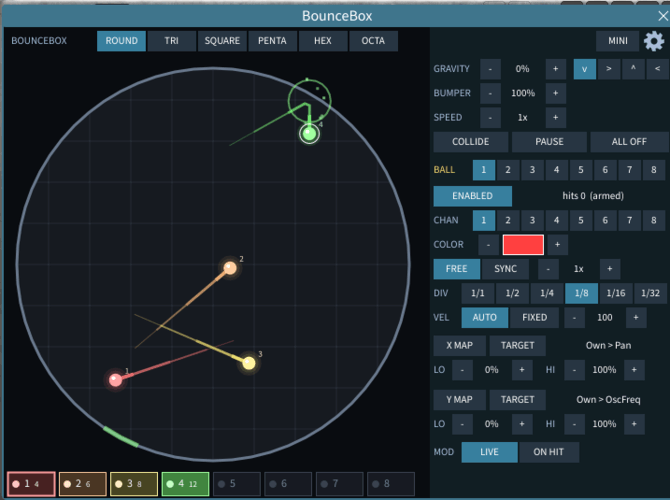
*BounceBox (v2.0.0)*
**Physics-Based Euclidean/Geometric Drum Trigger & XY Modulator**
A playful physics playground where up to 8 balls bounce inside customizable geometric rooms
(circle, triangle, square, pentagon, hexagon, octagon).- **Key Features:** Each ball triggers its assigned drum channel on wall impacts—or triggers both channels simultaneously
when ball-to-ball collisions are enabled.
- **Controls & Modulation:** Individual ball speeds (free or tempo-synced), velocities, and optional X/Y position-to-parameter
mappings, plus global gravity (strength & angle), bumper physics, 25 visual customization options, and a Mini-View.
BounceBox.mtscript.zip(22.1kB, 23 downloads)*EnvForge (v1.0.1)*
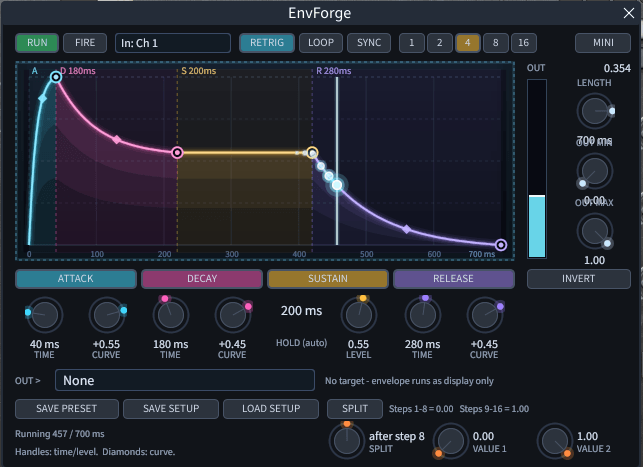
**Note/Step-Triggered Envelope Modulator & Step Splitter**
A flexible ADSR/AR envelope generator triggered by incoming MIDI notes, sequencer steps (any channel or Ch 1–8), or manual firing.- **Key Features:** Interactive visual curve editor with adjustable concave/linear/convex slopes, toggleable envelope stages,
loop/retrigger/step-sync modes, and output inversion/scaling.
- **Bonus Mode (SPLIT):** Includes a dedicated Step-Split mode that alternates between two target values across a pattern
(e.g., switching Morph between 0 and 1 at step 8 to flip between presets A and B).
EnvForge.mtscript.zip(23.3kB, 25 downloads)Lissajous
Version: 1.0.0
Date: 2026-11-10What it does
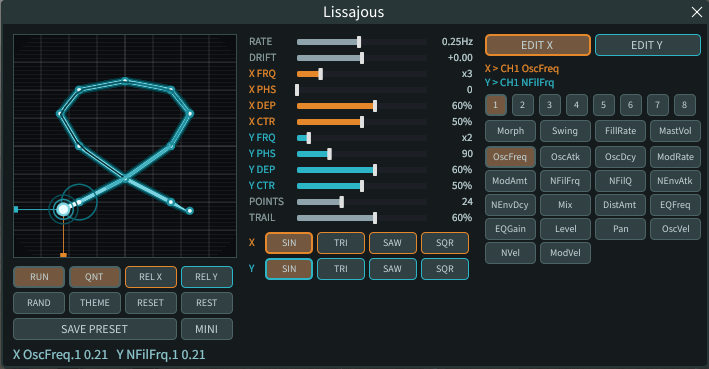
Two LFOs (one per axis) draw a Lissajous figure with glow, scanlines, a fading trail and projection guides. The X and Y position of the moving dot are written to two Microtonic parameters you pick (any of the 8 channels, or a global parameter).
Controls
- **X / Y rows** (orange / teal): frequency ratio (integer 1-12, so the figure closes), phase, depth, centre. Shape buttons SIN / TRI / SAW / SQR per axis. REL X / REL Y: modulate around the value the knob had.
- **RATE / DRIFT**: speed of the figure; slow phase drift of the Y axis (the figure rotates and morphs).
- **QNT + POINTS**: samples the curve into N points connected by straight lines; the dot and the parameters follow those segments. The current segment lights up and every vertex sends a ripple.
- **Selector**: EDIT X / EDIT Y, then channel 1-8 + parameter, or a global parameter (Morph, Swing, FillRate, MastVol). Only continuous parameters are offered.
- **Sliders**: drag a bar; click the name or right-click to reset it.
- **RUN**: pause = knobs hold their value. **RESET**: knobs back to the values they had before. **REST**: restore knobs on close (off by default).
- **SAVE PRESET**: writes a copy of the current preset (.mtpreset) so you can close the window and keep the sound.
- **MINI**: swaps the big window for a small strip. The LFOs only run while one of the two windows is open.
Lissajous.mtscript.zip(17kB, 26 downloads)*PathFinder (v1.0.0)*
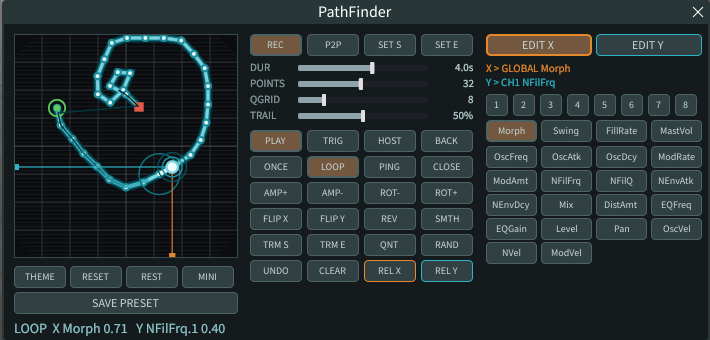
**XY-Pad Motion Sequencer & Path Modulator**
Draw freehand automation paths or plot point-to-point trajectories on an XY pad and map the X and Y coordinates to any
continuous Microtonic channel or global parameter.- **Key Features:** Freehand recording (REC) & point-to-point (P2P) path editing, geometric transformations
(amplitude, 15° rotation, flip, reverse, smoothing, trim, grid quantization), and 30-level undo.
- **Playback & Routing:** Supports Once, Loop, Ping-Pong, and Reverse modes with host-sync transport start,
relative parameter modulation, preset saving, and a compact Mini-View strip.
PathFinder.mtscript.zip(27.5kB, 24 downloads)AAV
Excellent Philter! Thanks so much for sharing these!
philter
- AAV wrote:
Excellent Philter! Thanks so much for sharing these!you are welcome! hope you like it
You need to be signed in to post a reply