Dean Sokolov
Preset Browser for Synplant 2
Hi everyone!
I'm excited to introduce a preset browser for Synplant 2!1. Preset list

Shows your entire library at once — factory presets, third-party packs, and your saved patches all in one place.
For each preset you see the name and category (Bass, Pads, Leads, FX, etc.).
Duplicates in the factory library are filtered out automatically, so you see each preset only once.
When you add presets through Synplant's main interface, they show up automatically in Mine (auto-added to the browser).
P.S. — on the first launch there's a preset scan (about 3–5 seconds).
If you want to refresh the preset database manually, useShift + left-click.2. Scrolling
Drag the list with the mouse (drag-scroll), like on a phone — let go and the list glides and eases to a stop.
Thin scrollbar on the right.‹ ›arrows to move to the previous/next preset.
Smooth scrolling, no stutter even with thousands of presets.3. Search field
The search field is at the top of the browser.
Type, and the list filters live as you go.
Searches by name and folder/category.
The clear×button resets the query and returns you to where you were before searching.
You can type even when the window isn't focused.4. Section navigation (tabs)
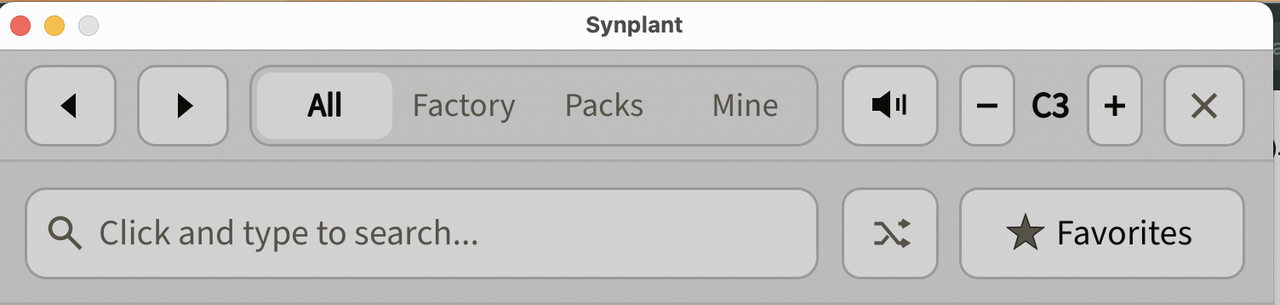
All — the entire library.
Factory — only Sonic Charge factory presets.
Packs — third-party packs. Opens in two levels: first a list of packs (as folders, with preset counts), then click a pack to go inside and see its presets. The‹ Backarrow returns to the pack list.
If Packs don't show up automatically, click the Name header and holdShift— a scan will run and the folders will appear.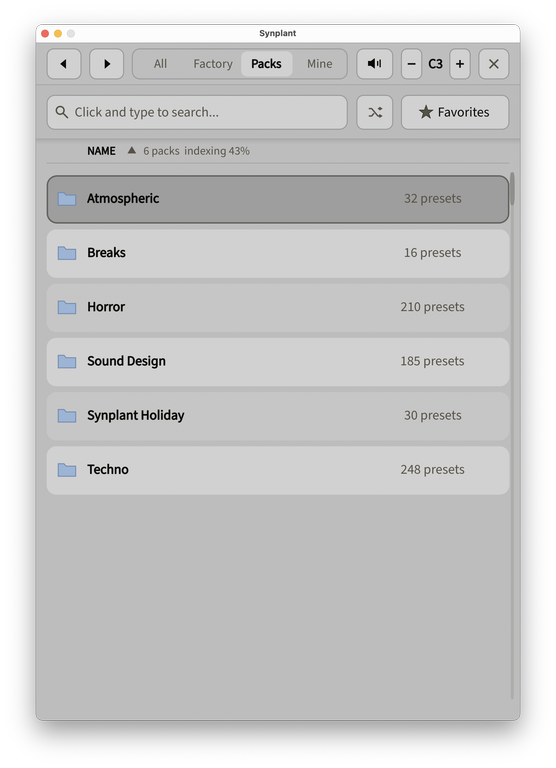
Mine — your saved presets (from Synplant User Patches). Auto-detected when you add them through Synplant's main interface.
5. Category and sorting
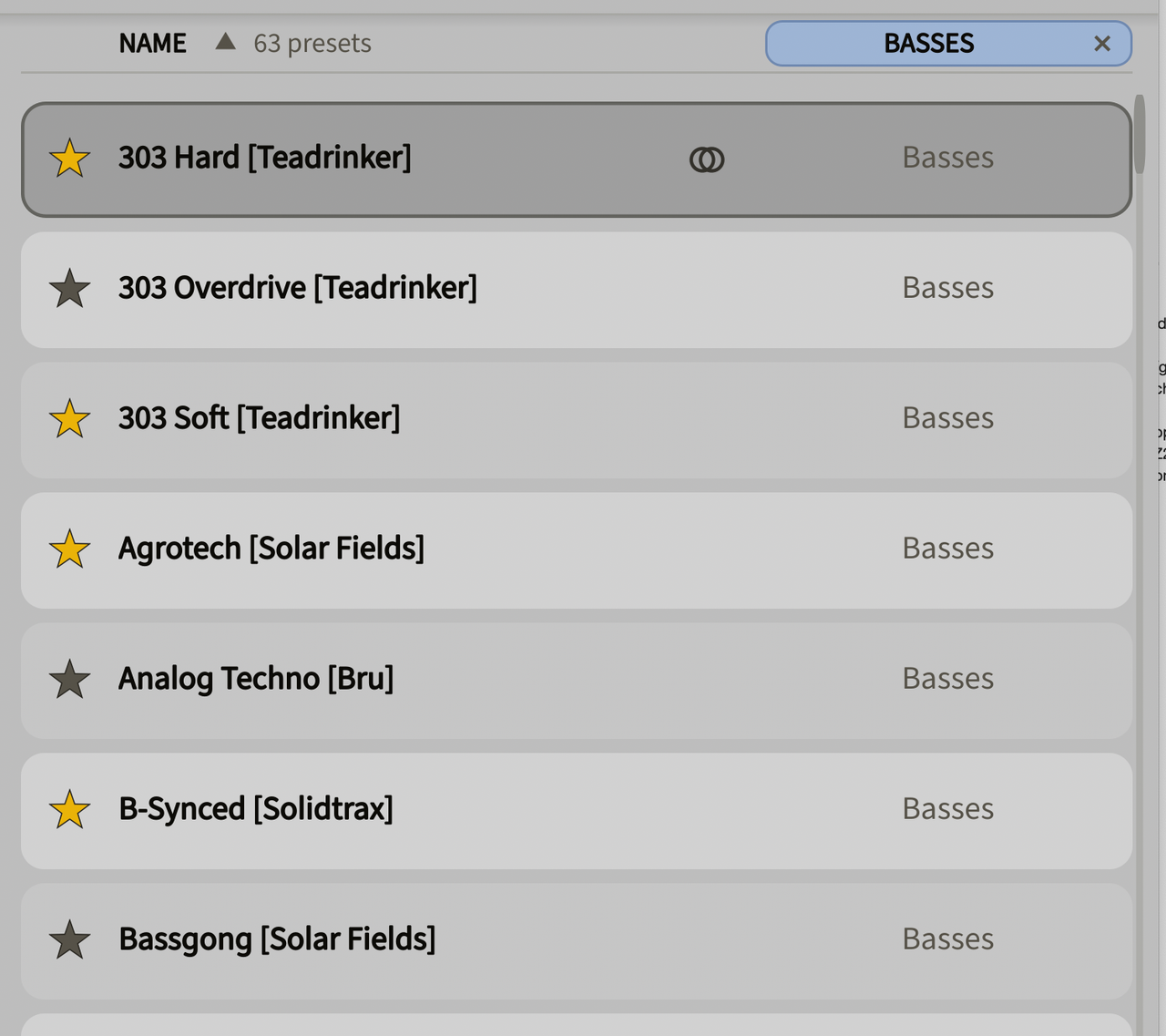
Click the NAME header — toggles sorting A→Z / Z→A (the arrow shows the direction).
Click the CATEGORY header — filters the list by the selected preset's category (the active filter is shown as a colored box; click the×to remove it).
Any change of filter/sorting resets the list to the top.6. Favorites
The star in a row adds/removes a preset to favorites (gold = favorited).
The Favorites button shows only your favorites.
Favorites persist between sessions. When you enter Favorites, the browser remembers your spot and returns you there when you leave.7. Audition (preview)
When you select a preset it plays right away (loaded into the synth as a preview), and a short note is played.
The sound button (speaker) toggles auto-preview on/off. Off = silent browsing (the preset still loads, so you can play it from a MIDI keyboard).
Octave buttons− +set the pitch of the preview note (C1…C6).
Double-click a preset — loads it into Synplant and closes the browser.8. Find Similar

Each selected row has an icon of two overlapping circles — click it, and the browser ranks the whole library by sonic similarity to that preset.
Similarity is based on perceived characteristics (attack, length, sustain, brightness, movement, space, etc.) rather than raw parameters, so a bass sounds similar to a bass, not to a pad.
Results come with a match percentage (colored bars: green ≥90, amber 80–89, orange below) and some diversity, so the list spans different collections.
At the top there's a filter with the source preset's name; click it to return to the normal list.
New presets are analyzed automatically — you don't need to do anything.9. Random preset
The random button jumps to a random preset, respecting the active filter (e.g. "random Lead" if the Lead category is open).
Extras
The library is scanned once and cached, so reopening is instant.
Newly saved presets are picked up automatically on reopen (no need to reload the plugin).
Windows: on the very first launch, the plugin will ask once for access to the preset folders — this is normal. The browser caches preset data, so browsing and loading won't trigger these prompts afterward.Installation
Copy the contents of the archive into the
Modsfolder (if it doesn't exist inSynplant Scripts, just create it).
Mac —Library/Application Support/Sonic Charge/Synplant Scripts/Mods
Windows —Program Files/Sonic Charge/Synplant Scripts/ModsHow to open?
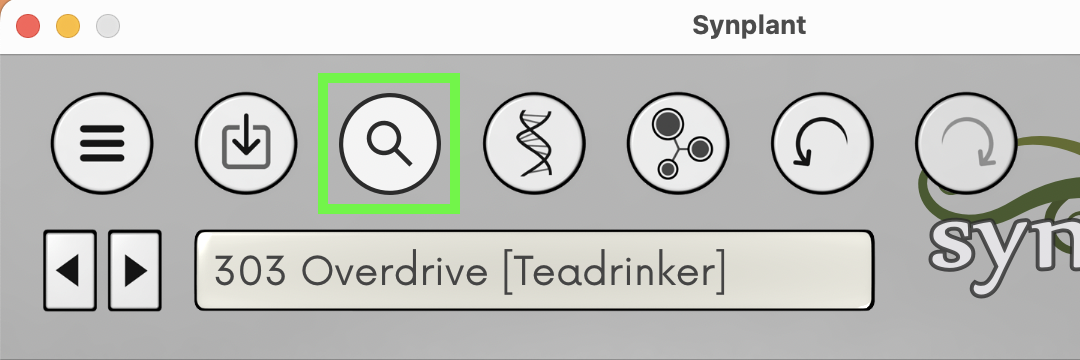
After installation, a magnifier button appears in Synplant's top bar (right after Save Patch), plus a Preset Browser… item in the main menu. Either one opens the browser window over Synplant 2. Close it with the
×in the window corner.Minimum Synplant version: 2.0.2.
I warmly welcome discussion and would be grateful for help with testing!
This is the first release, so any feedback is worth its weight in gold.Especially useful to check:
- Mac and Windows — how it installs and opens, whether there are any differences.
- Large libraries and third-party packs — speed, scrolling, Packs display.
- Audition and Find Similar — whether they work sensibly on your presets.
- Favorites and Mine — whether they persist between sessions and pick up new presets.
Found a bug or something odd — please post in the thread: OS, Synplant version, what you did, and what happened.
Ideas and suggestions are very welcome too. Thanks for testing! 🌱Best regards,
Dean Sokolov
deansokolov@yahoo.comAAV
Dean - This is really lovely. Pretty incredible and something that will complement Synplant very well. However I ran into a couple of snags. I am on Windows 11, running Synplant 2.0.2 in Fender Studio Pro 8.1 as a VST3. My DAW is an older i9 (9900k with 16 GB of RAM). First of all the browser scans all folders in C:\Program Files\Sonic Charge for Synplant presets. I have all SC plugins so everything was scanned. In the case of Microtonic, I have a ton of presets and folders for Patternarium best/worst generation. Each folder needed an approval or disapproval to proceed even though I have no Synplant presets. Same for bitspeek, echobode, permut8, cyclone. In the end I ended up with 6700 or so presets and 14 "packs", which seemed right) but I did get a few Synplant "Out of Memory" error message on a few occasions while scanning and indexing presets. The browser itself works really well, and is absolutely awesome and will be a great addition to usable workflow when using Synplant. However, the preset preview feature only stops the sound for pluck, or piano style presets - all pads, strings, many rhythmic presets, etc all play forever unless you turn off the preview feature. I just turned down the sound on the track, and continued to browse, which is really nice. The only real "deal breaker" is that I continue to get occasional Synplant "Out of Memory" error messages. Each time I attempt to restart a scan I seem to get partway through then get an "Out of Memory" message. Shift-Click gives a "Scanning Library" message but doesn't actually seem to be completing. (If I close and re-open Synplant, then open the browser mod, it correctly shows 6694 presets and identifies 14 packs, but starts indexing again). Anyway many thanks for your efforts. I hope this information is helpful and I look forward to seeing your response and hopefully some suggestions, or a fix to help to resolve the issues. Will also be interested to hear from others on their experiences trying it out. Great! and many thanks Dean!
Dean Sokolov
- AAV wrote:
Dean - This is really lovely. Pretty incredible and something that will complement Synplant very well. However I ran into a couple of snags. I am on Windows 11, running Synplant 2.0.2 in Fender Studio Pro 8.1 as a VST3. My DAW is an older i9 (9900k with 16 GB of RAM). First of all the browser scans all folders in C:\Program Files\Sonic Charge for Synplant presets. I have all SC plugins so everything was scanned. In the case of Microtonic, I have a ton of presets and folders for Patternarium best/worst generation. Each folder needed an approval or disapproval to proceed even though I have no Synplant presets. Same for bitspeek, echobode, permut8, cyclone. In the end I ended up with 6700 or so presets and 14 "packs", which seemed right) but I did get a few Synplant "Out of Memory" error message on a few occasions while scanning and indexing presets. The browser itself works really well, and is absolutely awesome and will be a great addition to usable workflow when using Synplant. However, the preset preview feature only stops the sound for pluck, or piano style presets - all pads, strings, many rhythmic presets, etc all play forever unless you turn off the preview feature. I just turned down the sound on the track, and continued to browse, which is really nice. The only real "deal breaker" is that I continue to get occasional Synplant "Out of Memory" error messages. Each time I attempt to restart a scan I seem to get partway through then get an "Out of Memory" message. Shift-Click gives a "Scanning Library" message but doesn't actually seem to be completing. (If I close and re-open Synplant, then open the browser mod, it correctly shows 6694 presets and identifies 14 packs, but starts indexing again). Anyway many thanks for your efforts. I hope this information is helpful and I look forward to seeing your response and hopefully some suggestions, or a fix to help to resolve the issues. Will also be interested to hear from others on their experiences trying it out. Great! and many thanks Dean!Wow, thank you so much for such a thorough test. This is exactly the kind of feedback that makes a tool better, and I really appreciate it.
You've pinpointed three things, and they're all spot on:It's scanning the whole Sonic Charge folder, not just Synplant. It's reaching into the other plugins' folders (Microtonic, Bitspeek, etc.). I'll scope the scan to the Synplant presets folder only. As for the access prompts, on Windows that happens on the first run; it won't repeat after that, since a cache is created in Documents/Sonic Charge and everything is read from there going forward.
The "Out of Memory" errors - this is the main one and my priority. Synplant scripts have limited memory, and on a library your size the indexer is clearly holding too much at once.
Preview not stopping on pads/strings/rhythmic patches - good catch. Short sounds fade on their own, but sustained ones need an explicit note-off. I'll add that so previews stop cleanly on any sound.This is incredibly helpful. I'll work through it and post an updated version. Thanks again for your time and the kind words :)
AAV
Wonderful! Thanks so much Dean!
Alexey Sobolev
Wow, that’s really useful! Thank you!
I wonder if it would be possible to add the ability to combine multiple presets into a single one?cheers!
Dean Sokolov
- Alexey Sobolev wrote:
Wow, that’s really useful! Thank you!
I wonder if it would be possible to add the ability to combine multiple presets into a single one?
cheers!Hi Alexey! Thank you so much for the kind words - really glad it's useful to you! 😊
Right now I'm focused on fixing a few things people ran into, so let me get those sorted first. Once that's done, I'd love to explore the "combine presets" idea and figure out how it could actually work. It's a fun one to think about!
I can't promise anything just yet, but it's definitely noted. Thanks again for the great suggestion and for trying it out!Magnus Lidström
Dean Sokolov sent me a preview of this script before posting it here, and I have to say I was very surprised and impressed by how much he managed to pull off with virtually no documentation.
This browser rocks!
The funny thing is that I’m just about to finish the first version of the official Synplant Script SDK, complete with documentation and tools for AI-assisted development. Seeing what Dean accomplished without any of that makes it even more impressive.
Well done, Dean! 👏
Dean Sokolov
- Magnus Lidström wrote:
Dean Sokolov sent me a preview of this script before posting it here, and I have to say I was very surprised and impressed by how much he managed to pull off with virtually no documentation.
This browser rocks!
The funny thing is that I’m just about to finish the first version of the official Synplant Script SDK, complete with documentation and tools for AI-assisted development. Seeing what Dean accomplished without any of that makes it even more impressive.
Well done, Dean! 👏Thank you so much, Magnus - coming from you, this genuinely means the world to me. 🙏
And thank you for being so open and welcoming about it, and for letting me share it with the community, that support means a lot, and it's a big part of why building for Synplant has been such a joy.
Synplant is just such an inspiring instrument that I really wanted this to exist. And with the official SDK, I'm sure we'll see a lot of amazing things from the community. Thank you again 🌱AAV
High praise from Magnus. Well deserved Dean! Thanks for all your efforts!
Pascal Niemeier
Looks great, but seems here a problem with access permissions during scanning (Synplant Patches under Program Files(Windows). Have to check how to solve that - giving exception to this folder for user didn't seem to work, so nag screens keep on popping in Synplant and Cubase freezes for a moment...
You need to be signed in to post a reply