Francesco Casanova
Hello everyone!
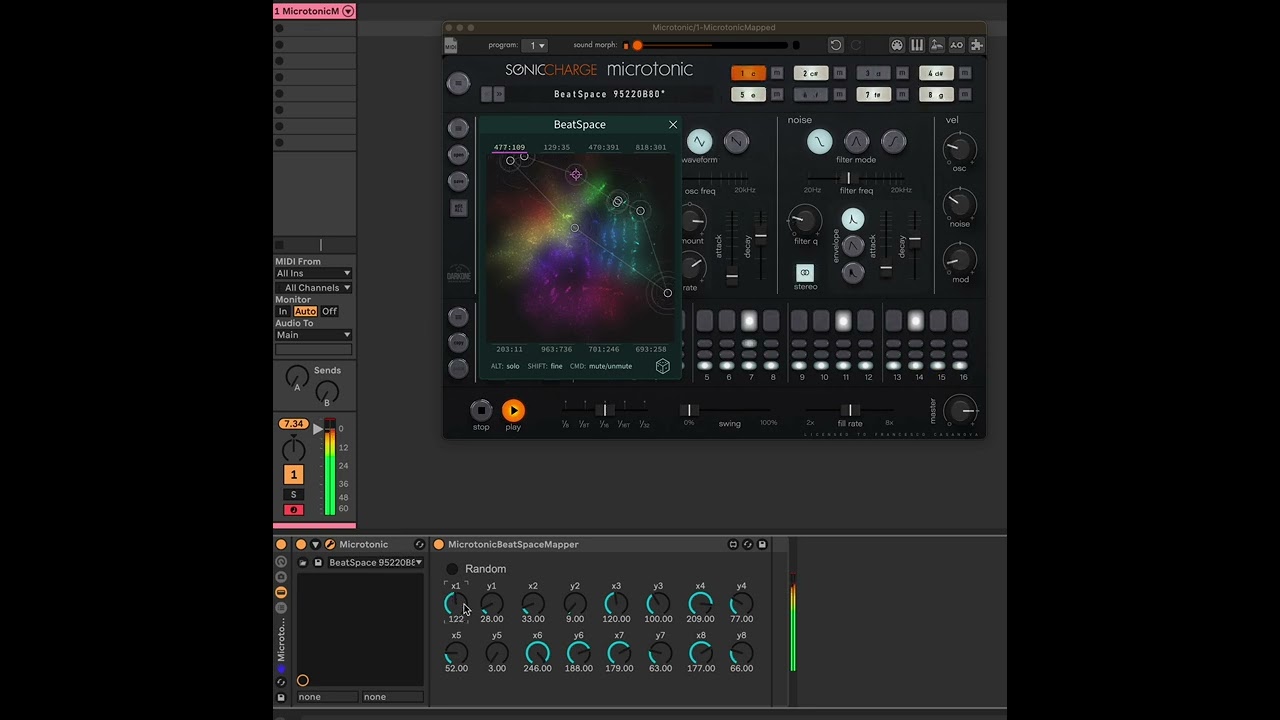
Francesco aka Cippo from ItalyI really enjoyed the BeatSpace feature of Microtonic and I felt a bit disappointed that was not mappable in MIDI or whatever. So i tried to "hack it" I hope Magnus will not be angry with it.
The principle is simple, i modified the BeatSpace_main.js file that you can find in ~/Library/Application Support/Sonic Charge/Microtonic Scripts/BeatSpace.mtscript/ adding the feature that is continuosly reading a .JSON file every 30msec where inside there is the array with all the X and Y coordinate of every point.
Then i created a MaxForLive that is writing continuosly that specific file in realtime, using live object in Max you will be able to map every single parameter with Automation or LFO.
BUT
There is a huge limitation, all this things works if the interface of Microtonic it's open and the BeatSpace interface is open.Not a special thing but i think it's funny to try out with it.
Now it's working just on Mac because is the only system that i have but i will be open to some further updates for Windows if someone can contribute with it :)
I attached the two files, the modified script and the MaxForLive
Tested with Max 8.5, Max 9.0, Ableton 11, Ableton 12
MicrotonicBeatSpaceMapper.amxd(43.8kB, 1154 downloads)
BeatSpace_main.js(27.2kB, 1152 downloads)Andy Music
Very interesting!!! I don't have Max, but I'll try to implement it with Bettertouchtool or other workarounds.
Magnus Lidström
Haha! That is such a cool and inventive workaround!
Currently, the scripting system can’t interact with MIDI or run in the audio thread when the GUI is closed. We’re working on a new system for this, which should enable a lot of interesting, more controllable real-time scripts in the future.
But until such times, your solution for controlling Beatspace from the outside is probably as good as it gets.
ALEKSEI KRJUK
Super! Thank you. This is exactly what I was looking for for my live set.
Problem: I dropped your script into the Microtonic folder, added the .amxd device to the track with Microtonic, but nothing happens. Do I need to connect them somehow? I’m using Ableton 12.2.
Francesco Casanova
I've spoken with Aleksei, his problem was that was missing the file latentPoints.json inside ~/Library/Application Support/Sonic Charge/Microtonic Scripts/BeatSpace.mtscript/ so i've send him this file and now is working!
This is the file to download https://drive.google.com/file/d/1Vc68y80wri1IaaCmiHDInsOJKnGatBlu/view?usp=sharing
Blair_J
Any update on control mapping to BeatSpace? Any plans on supporting this functionality without this (ingenious) intervention, Magnus?
Andy Music
I want to share that I've successfully recreated this modified script implementation with BluecCat's Plug'n Script, so in theory now it could be used in any DAW.
Blair_J
Cool! No Max4Live needed? Any way I could give it a try?
Andy Music
- BlairJ wrote:
Cool! No Max4Live needed? Any way I could give it a try?I can find some time and share it, but you'll have to have a license for Plug'n script
Blair_J
Very kind offer… I’d be foolish to shell out if Magnus has it on the horizon, though…
Francesco Casanova
Hello everyone, i did an update of the code, now without using MaxForLive. I created a Python script that reads OSC inputs from the port that the user can choose. It's waiting a message parsed like so:
/myMultiTouch touchesByTime 1 0.046 0.810 2 0.439 0.440 ...where 1,2,...8 are the indexes of the points of BeatSpace and the other 2 numbers are the coordinates.The python script is basically writing down these numbers on the .json file perhaps you need to change the permission of the folder of the script using this command to make it work:
sudo chmod -R 777 "/Library/Application Support/Sonic Charge/Microtonic Scripts/BeatSpace.mtscript"I used the script succesfully with MobMuPlat (https://danieliglesia.com/mobmuplat/) on my very old IPad to send touchscreen data and mapped it to BeatSpace:

if you want to try it out unzip the BeatSpace.mtscript.zip in "/Library/Application Support/Sonic Charge/Microtonic Scripts/BeatSpace.mtscript" and overwrite the existent files (save them first for backup!!!!!) and then:
cd /Library/Application Support/Sonic Charge/Microtonic Scripts/BeatSpace.mtscriptpython3 server.py
and a window will pop-upLet me know if you try it out.
PS: i got inspired by your installation at Sonar!
BeatSpace.mtscript.zip(11.9kB, 441 downloads)
MobMuPlat.zip(198kB, 378 downloads)
Andy Music
Oh Francesco, thank you so much! I'm really interested in it! Will try it and share results. Maybe I'll be able to modify this so it works with multiple Microtonic instances independently
Francesco Casanova
You're welcome!
I tried to organize the ideas in this repository:
https://github.com/cipp0/Microtonic-BeatSpace-Multitouch-Bridge
You need to be signed in to post a reply