Arthur Veret
Hi SonicCharge and friends,
Yesterday I had a bit of a weird thing happen with the standalone version of Synplant 2.
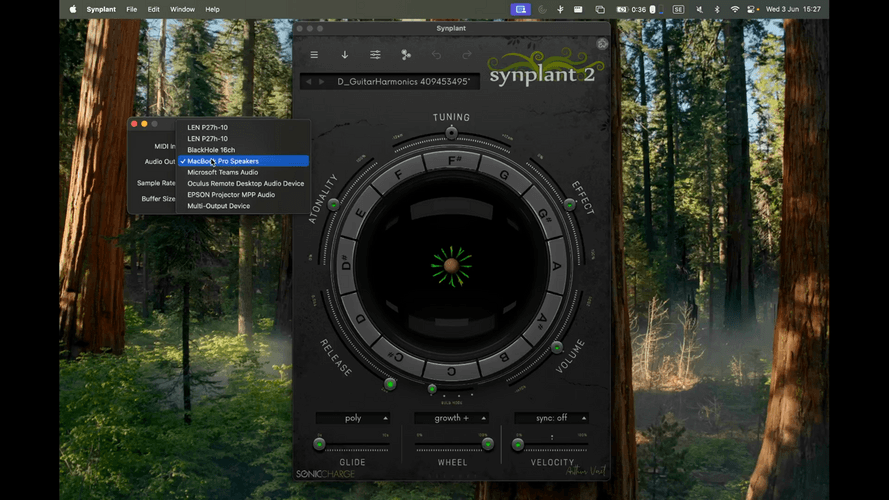
I was playing with it, using GenoPatch to try and replicate bells sounds, and I had OBS recording the video of the process.At some point, I put down my AirPods, and all of a sudden I was never able to get audio back from Synplant, and the keyboard (actually typing keyboard) does not seem to be registered anymore as a note entry keyboard by Synplant since there is no sound, and the envelopes are not moving in the genome page when I press - even pressing on the note names in the main seed page does not produce sound.
When I go to the Synplant settings, I see that the Midi In says None, and there is no Buffer Size selected, and if I try to select it does not work, making Synplant crash on the spot.
I recorded a video of the phenomenon as I can't seem to be able to change the settings.
Weirdly enough, the VST version still works.
I have also just tried reinstalling it, and unfortunately this has the exact same problem ..Finally I also tried to track all the Files and Ports linked to the Synplant 2 Application when it was running and could not find any way to remore a .settings file or anything to reset it.
Would appreciate the help !
Tech : using a MacBook Pro M1 on Tahoe.
Video attached : On the video you can see me click on the notes and most of the time I am pressing my keyboard to try and trigger notes. I know it looks like the MacBook speakers are turned off but that was solely for the recording, I did not make that mistake :)Magnus Lidström
Thanks for the detailed report and video. Since the plug-in still works, this appears to be isolated to the standalone app’s device setup. The AirPods change may have left the standalone device configuration in a bad state.
(I remember I made some fixes to the device configuration in the standalone version, so hopefully it will not happen in the next release.)
Please quit Synplant, then remove this preference file:
~/Library/Preferences/com.soniccharge.synplant.plistAfter that, start Synplant again and open
Synplant > Device Settings...from the macOS menu bar. You should then be able to select your audio output, MIDI input, sample rate, and buffer size again.If it still crashes after resetting that file, please send us the latest Synplant crash report from
~/Library/Logs/DiagnosticReports/Arthur Veret
Hi Magnus, and thanks a lot for the swift response !
I cannot find this preference file in the Library/Preference, in fact I can't seem to be able to find anything related to Synplant in there.
The only logs somehow related to Synplant that I found in the DiagnosticReports is linked to "lonewolf", which seems to be linked to Synplant.
I have attached a .hang file here.
lonewolf_2026-06-04-132504_M-CP2VJJ9***.hang(6.68MB, 15 downloads)Magnus Lidström
Thanks. Yes,
lonewolfis the standalone wrapper, so that hang report is the right one to send.It is odd that you cannot find the preference file. It should normally be there after you have run the standalone at least once. One thing to check: the
~in the path means your home folder. In Finder, chooseGo > Go to Folder...and paste this exact path:~/Library/Preferences/Then look for:
com.soniccharge.synplant.plistAlso, please let me know the exact Synplant standalone build. Open the About box in the standalone app, then click the version number at the bottom right. It will show detailed build information. With that information I can match the
.hangreport to the correct build and debug.Arthur Veret
Got it, for some reason following the paths manually was not bringing me to this folder, but pasting it worked.
I deleted the file in Preferences, restarted Synplant, but I still had the same issue with the selection of the Buffer Size, and still no Midi notes seemingly registered and no sound coming from Synplant.
My standalone build is 2.0.2 (build 309) for mac.arm64 !
You need to be signed in to post a reply